
Upload a identity document to be processed and verified. This is a two part process; the first part is to obtain the secure signed upload urls for the document type and the second part being the upload of the documents to the associated URL.
The document verification result is asynchronous. The results will be sent via a POST request as a Webhook (please see the Webhooks section below)
Some document types require images of the front (recto) and back (verso) of the identity document. Passports only require the image of the photo page.
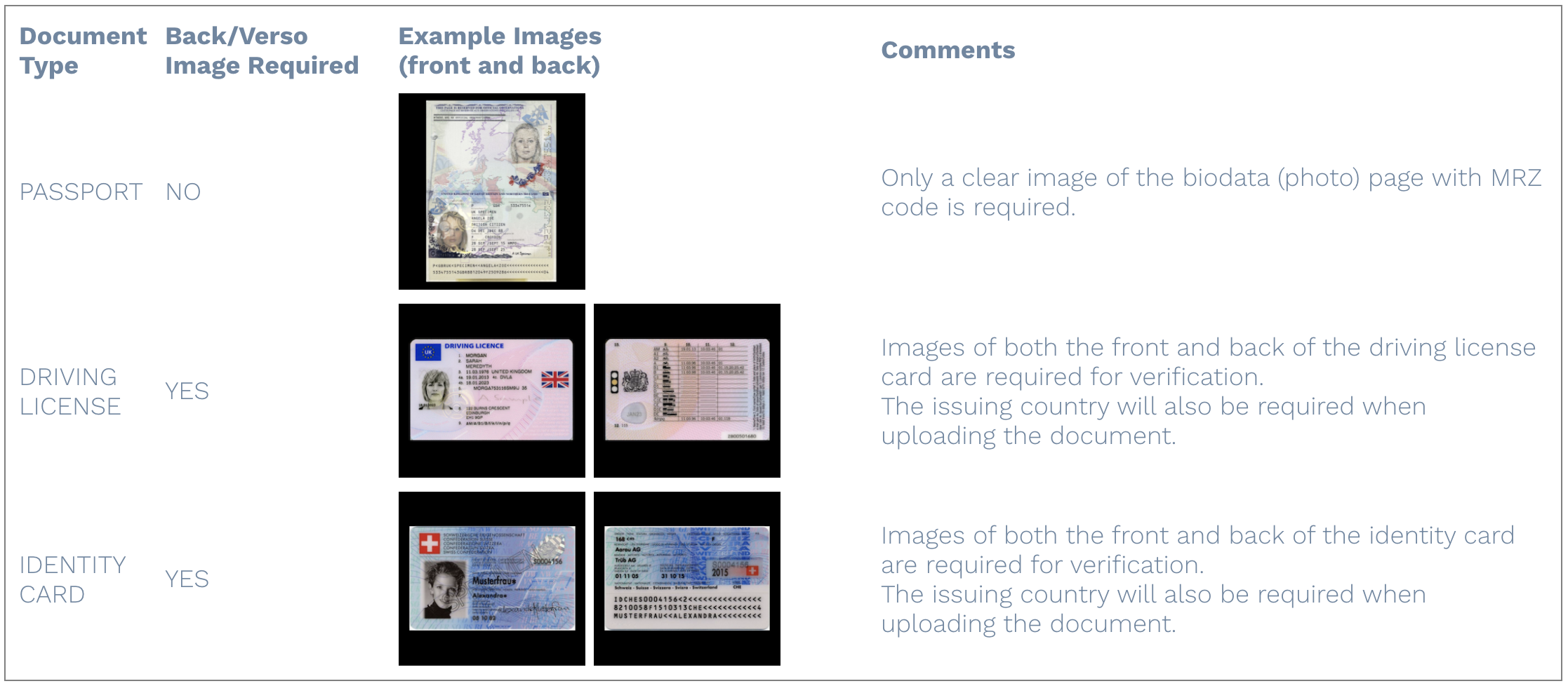
The image format must be jpeg, png or pdf and under 4.5MB.
The following conditions are recommended when taking a photo of an identity document: ensure the document is within the image capture frame so the edges can be seen, no fingers obstructing the information, no photocopies of the original and avoid glare/shine/white spots on the image.
Step 1 - Get the signed URLs
Make a HTTPS POST request to https://api.lemverify.io/api/v1/{account_id}/document/upload, where {account_id} is your LEM Verify account id found in the Account Setup section of the dashboard.
The body must contain the following parameters:
| Field | Type | Required | Notes |
|---|---|---|---|
| clientRef | String | Optional | A String containing your own unique client reference number |
| redactMe | Boolean | Optional. Default is false | If set to true the documents will be redacted as per your settings. |
| documentType | Integer | Optional, but strongly recommended to include this. | The type of document being sent for verification. Values are as follows: 1 = PASSPORT 2 = DRIVING LICENSE 10 = IDENTITY CARD Please note that if this parameter is not supplied then verification processing times might be longer that usual and you may incur additional charges. |
| documentCountry | String | Optional, but strongly recommended to include this. | The issuing country of the document in the ISO 3166-1 alpha-2 format. Please note that if this paramater is not supplied then verification processing times might be longer that usualand you may incur additional charges. |
If the request is successful (200 response) then the response body will look similar to the following:
{
  "id": "8a20ab90-37a1-11e9-a79c-891da1f19982",
  "friendlyId": "vVebr9keyfZ2sctoZkMfBG",
  "rectoUrl": "https://s3.eu-west-1.amazonaws.com/uploads.lemverify.io/...",
  "versoUrl": "https://s3.eu-west-1.amazonaws.com/uploads.lemverify.io/..."
}
The id is a uuid for the verification, the friendlyId is a short uuid (mostly used for internal referencing at LEM, that you will see on the dashboard).
Please note: The URLS you receive will expire in 30 seconds, so you need to ensure you upload the images within 30 seconds or you will receive a 403 error. If you need a longer expiry please contact [email protected]
Step 2 - Uploading the images to the URLs
To upload the images for the verification you need to make a HTTPS PUT request to the URL from the previous step (use the rectoUrl for the front of the document image, and the versoUrl for the reverse side of the document image.)
The required Headers are:
Content-Type: image/jpeg
For example, you could (very quickly - remember the 30 second expiry time of the URL) CURL to upload the documents, for example:
curl -H "Content-Type: image/jpeg" -X PUT -T ${image location} -L ${url}
Considerations
Once a verification is completed it will be retained in the LEM Verify system for 7 days, where it will then be permanently deleted.
You will have 30 seconds to upload both sides of a document or the verification will not process.